
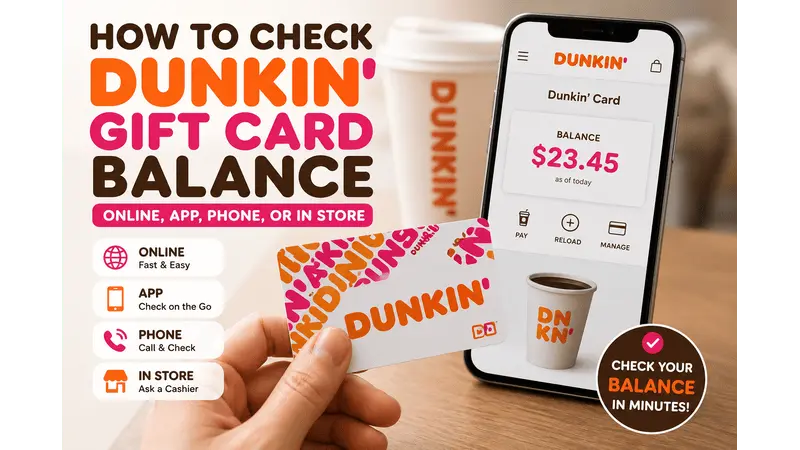
How to Check Dunkin Gift Card Balance Quickly
Want to check your Dunkin gift card balance? If you have your card number and PIN, checking your Dunkin gift card balance online is the fastest option. You can also do it through the Dunkin app, by phone, and at a store. This guide walks you through every method step by step.
How to Check Your Dunkin Gift Card Balance
Before you begin, make sure you have:
- Your Dunkin gift card.
- The gift card number.
- The PIN or security code (usually covered by a scratch-off strip).
- An internet connection if you’re checking online or in the app.
Having this information ready makes the process quick and hassle-free.
Method 1: Check Dunkin Gift Card Balance Online
The easiest way to check Dunkin gift card balance is through the official Dunkin website.
Follow these steps
step 1: Visit the official Dunkin website and tap the three-line menu in the upper-right corner.
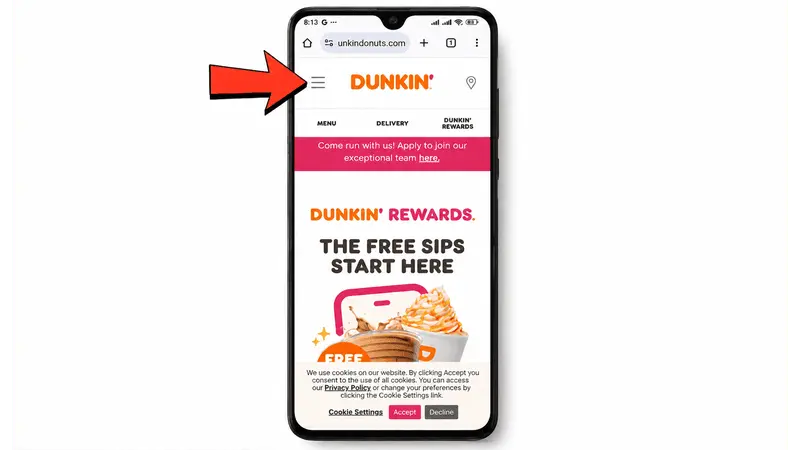
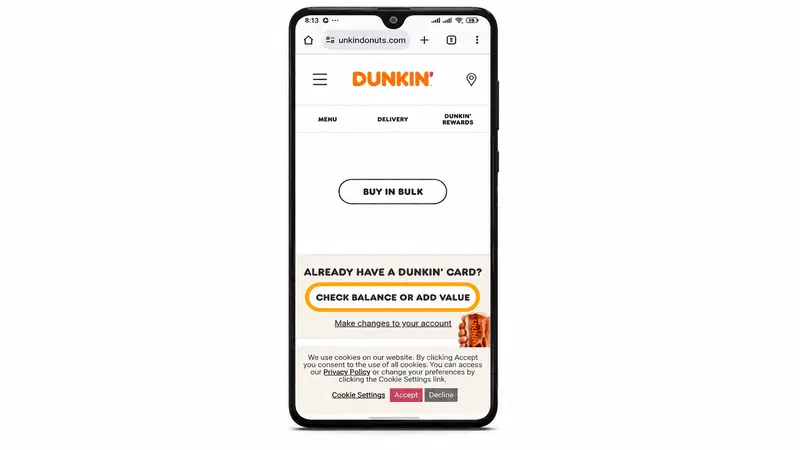
Step 2: Select the Dunkin Card and scroll to check the balance or Card value.
Step 3: Then enter your gift card number and PIN.
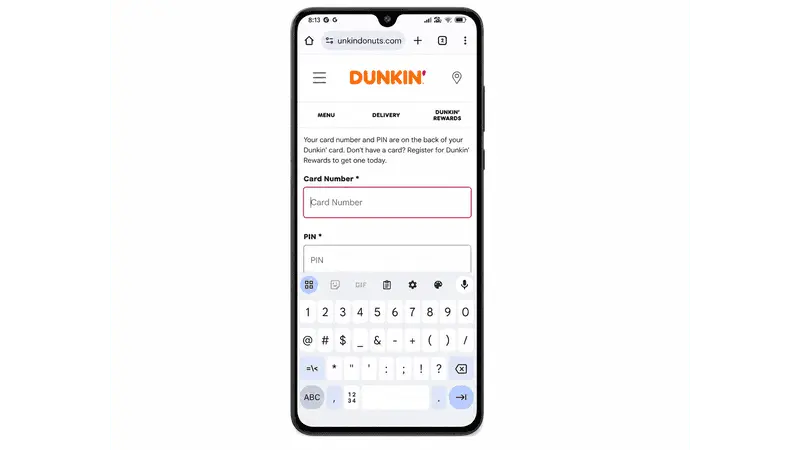
Step 4: Click on the “Submit” button.
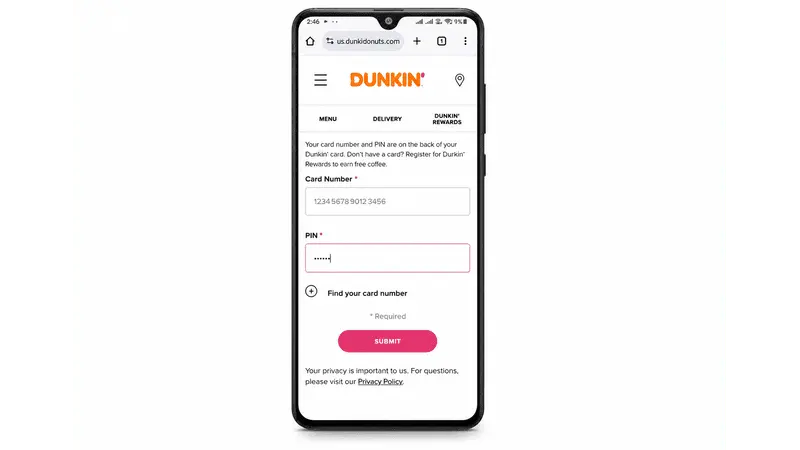
Your Dunkin gift card remaining balance will appear instantly. This method is ideal if you want a quick Dunkin card balance lookup before placing a mobile or in-store order.
Method 2: Check Your Dunkin Card Balance in the App
If you’ve added your gift card to your Dunkin account, checking your balance is even easier.
Steps:
- Open the Dunkin app.
- Sign in to your account.
- Tap Cards or Dunkin Card.
- Select your saved card.
Your available balance will appear immediately.
Using the Dunkin gift card balance app also lets you reload your card, pay for purchases, and manage your Dunkin Rewards account.
Method 3: Check Dunkin Gift Card Balance by Phone
If you don’t have internet access, you can still check your balance with this method:
- Call 1-800-447-0013.
- Select Option 2 when prompted.
- Follow the automated instructions.
- Enter your gift card information if requested.
You’ll hear your Dunkin card balance by phone within minutes. This option is useful if you’re unable to access the website or app.
Method 4: Check Your Balance at a Dunkin Store
You can also visit any participating Dunkin location.
Simply:
- Give your gift card to the cashier.
- Ask them to check the remaining balance.
- They’ll scan the card and tell you how much is left.
This is the easiest option if you don’t know your PIN or prefer in-person assistance.
Can You Check a Dunkin Rewards Gift Card Balance?
Yes. If your gift card is linked to your Dunkin Rewards account, you can view your Dunkin rewards gift card balance directly from the Dunkin app or your online account.
Any purchases or reloads are reflected automatically, making it easy to keep track of your available funds.
Can You Reload a Dunkin Gift Card?
Yes. Most Dunkin Cards can be reloaded. You can add funds through:
- The Dunkin app.
- Your online Dunkin account.
- Participating Dunkin stores.
Reloading your card means you can continue earning rewards while avoiding the need to purchase a new gift card.
Can’t Check Your Dunkin Gift Card Balance?
If your Dunkin balance inquiry isn’t working, try these solutions:
- Confirm you’ve entered the correct card number.
- Double-check the PIN.
- Remove the scratch-off layer if the PIN isn’t visible.
- Refresh the page or try another browser.
- Update the Dunkin app.
- Try checking by phone instead.
- Visit a nearby Dunkin location for assistance.
If your card still isn’t recognized, contact Dunkin gift card customer service for help.
Tips for Managing Your Dunkin Gift Card
A few simple habits can help you get the most from your card.
- Register your gift card in your Dunkin account.
- Check your balance before placing a mobile order.
- Keep your card until the balance reaches zero.
- Reload your card instead of buying a new one.
- Save your digital card in the app for faster checkout.
Frequently Asked Questions
How do I check my Dunkin gift card balance online?
Visit the official Dunkin website, go to the Dunkin Card section, select Check Balance or Card Value, enter your card number and PIN, and click Submit.
Can I check my Dunkin gift card balance without a PIN?
For online balance checks, you’ll usually need your PIN. If you don’t have it, visit a participating Dunkin store or contact customer service for assistance.
Can I check my Dunkin gift card balance by phone?
Yes. Call 1-800-447-0013, choose Option 2, and follow the prompts to hear your available balance.
Can I check my Dunkin card balance in the app?
Yes. Call 1-800-447-0013, choose Option 2, and follow the prompts to hear your available balance.
Can I check my Dunkin card balance in the app?
Yes. If your card is linked to your Dunkin account, simply open the app and select your saved card to see your balance.
Do Dunkin gift cards expire?
Generally, Dunkin gift cards do not expire, and there are typically no maintenance fees. However, it’s always a good idea to review the terms and conditions printed on your card or available on the official Dunkin website.
Can I reload my Dunkin gift card?
Yes. You can reload eligible Dunkin Cards through the Dunkin app, your online account, or at participating Dunkin stores.
What should I do if my Dunkin gift card isn’t working?
Double-check the card number and PIN, try another balance-check method, or contact Dunkin customer service if the problem continues.
Can I use my Dunkin gift card for mobile orders?
Yes. Once your gift card is added to your Dunkin account, you can use it to pay for eligible mobile orders through the Dunkin app.